
Google Preferred Sources: గూగుల్ లో మనం ఏదైనా కొత్త విషయం గురించి search చేసినప్పుడు చాలా websites కనిపిస్తాయి. అందులో కొన్ని మనకు తెలిసినవి కనపడతాయి, మరికొన్ని ఫస్ట్ టైం కొత్తవి కనపడతాయి. కానీ మనం ఎప్పుడూ చదివే website నుంచి వచ్చిన article కొంచెం ముందుగా కనిపిస్తే బాగుంటుంది కదా? దీనికోసం Google లో Preferred Sources అనే feature ఉంది.
మీకు నచ్చిన website ని Preferred Source గా add చేసుకుంటే, ఆ వెబ్సైట్ మీరు సెర్చ్ చేస్తున్న టాపిక్ కి సంబంధించిన కొత్త article publish చేసినప్పుడు Top Stories లో ఎక్కువగా కనిపించే అవకాశం ఉంటుంది.
ఇంకోమంచి విషయం ఏమిటంటే, website owners కూడా తమ రీడర్స్ కి తమ website ని Preferred Sources లో add చేసుకునేలా button పెట్టుకునే అవకాశం Google ఇస్తోంది. అయితే ఇక్కడ ఒక విషయం ముందుగా clear చేసుకోవాలి. Preferred Sources అనేది Google Discover లో website ని Follow చేసే option కాదు.
Preferred Sources ని Google Search లో మీకు నచ్చిన sources కి కొంచెం ఎక్కువ ఇంపార్టెంట్ ఇవ్వడానికి వాడొచ్చు.
Google Preferred Sources అంటే ఏమిటి?
మీరు ఎప్పుడు చదివే websites కొన్ని ఉంటాయి కదా!
ఉదాహరణకు:
- Technology websites
- News websites
- Sports websites
- Finance websites
- మీకు నచ్చిన blogs
ఇవన్నీ మీరు regular గా చదువుతున్నారని అనుకుందాం. వాటిలో మీకు నచ్చిన వెబ్సైట్ ని Preferred Source గా యాడ్ చేసుకోవచ్చు. ఆ తర్వాత మీరు search చేస్తున్న విషయం గురించి ఆ website లో కొత్త ఆర్టికల్ ఉంటే, Google Top Stories లో ఆ sourceని ఎక్కువగా చూపించే అవకాశం ఉంటుంది.
సరే ఇప్పుడు ఒక ఉదాహరణ చెప్పుకుందాము. మీరు ఒక technology వెబ్సైట్ ని Preferred Source గా యాడ్ చేసుకున్నారు అనుకోండి. తర్వాత Googleలో “latest Android update” అని search చేశారు.
మీరు యాడ్ చేసిన website కూడా అదే Android update గురించి కొత్త ఆర్టికల్ పబ్లిష్ చేసి ఉంటే, ఆ ఆర్టికల్ Top Stories లో కనిపించే అవకాశం పెరుగుతుంది. కానీ దీని అర్థం ఈ website Googleలో first rank వస్తుంది అని కాదు.
మీ Google Search results లో మీకు నచ్చిన sources కి preference ఇవ్వడానికి ఉపయోగపడే ఆప్షన్ మాత్రమే.
Googleలో Preferred Source Add చేయడం ఎలా?
ఇది చేయడం చాలా simple, స్టెప్ బై స్టెప్ ఫాలో అవ్వండి.
Search Personalization ద్వారా add చేయటం:
Step 1: Google App Open చేయండి
మీ మొబైల్ లో Google App ఓపెన్ చేయండి.
Step 2: Profile Pictureపై Tap చేయండి
పైన కనిపించే మీ Google Account Profile Picture మీద tap చేయండి.
Step 3: Source Preferences Open చేయండి
ఇప్పుడు Search personalization మీద క్లిక్ చేసి Source preferences లోకి వెళ్లండి.
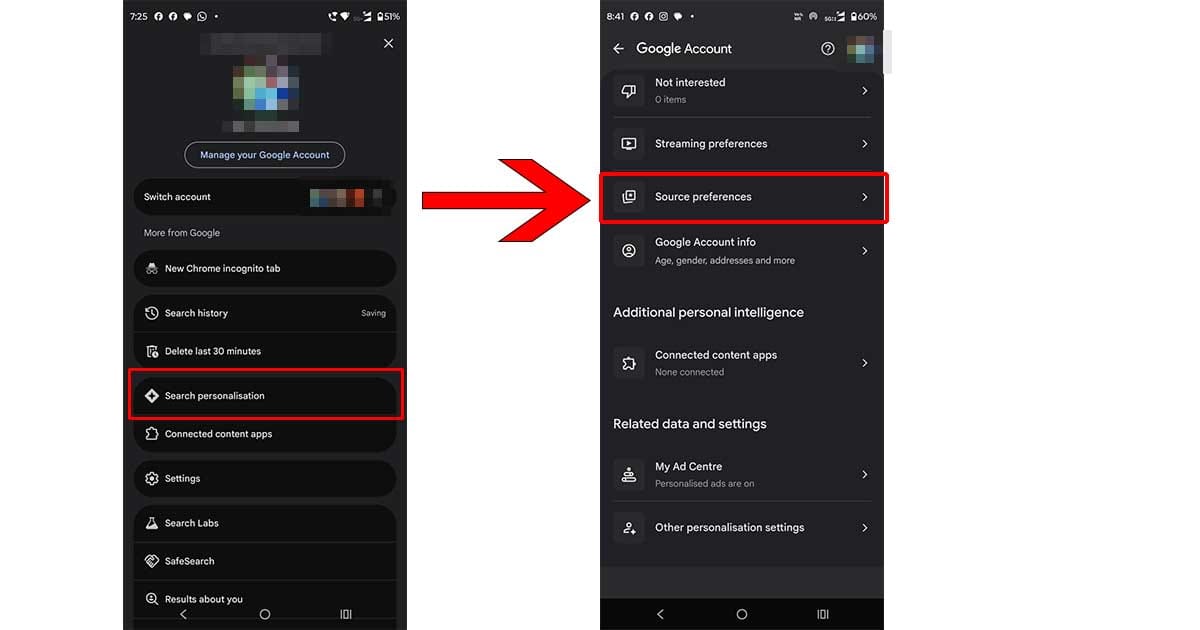
Step 4: Website Search చేయండి
ఇక్కడ search box లో మీకు నచ్చిన website పేరు లేదా domain టైప్ చేయండి.
ఉదాహరణకు మన వెబ్సైటు telugutechtrain.com అని సెర్చ్ చేయండి.
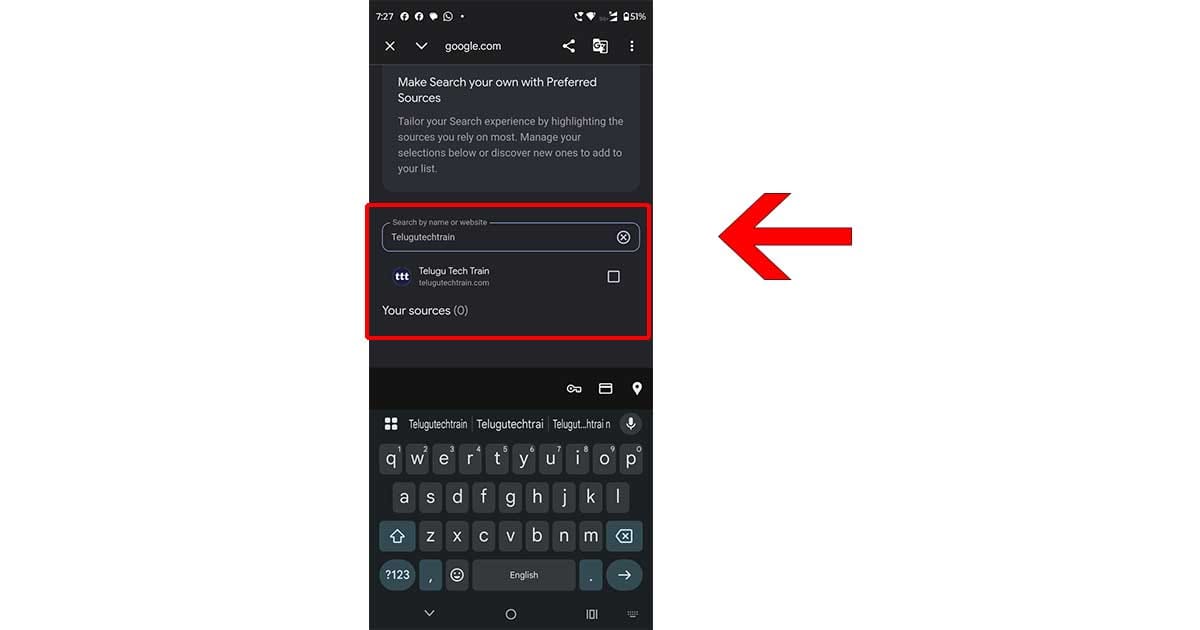
Step 5: Website Select చేయండి
Website కనిపిస్తే దాని పక్కన ఉన్న checkbox నిసెలెక్ట్ చేయండి.
అంతే మీరు add చేసిన websites Your sources sectionలో కనిపిస్తాయి.
Preferred Source Add చేసిన తర్వాత ఆ Website Posts మాత్రమే కనిపిస్తాయా?
లేదు అని చెప్పుకోవచ్చు. ఇది చాలా important. మీరు ఒక websiteని Preferred Sourceగా యాడ్ చేసినంత మాత్రాన Google మిగతా website లను కనపడకుండా చేస్తుంది అని కాదు. దీన్ని ఇలా అర్థం చేసుకోవచ్చు అంటే ఈ website లో మనకి ఉపయోగపడే relevant article ఉంటే దీనికి కొంచెం preference ఇవ్వు అని. Google మిగతా useful websites నుంచి వచ్చిన articlesను కూడా చూపిస్తుంది.
ప్రతి Article Top Stories లో వస్తుందా?
రాదు. Preferred Source గా యాడ్ చేసిన website publish చేసే ప్రతి ఆర్టికల్ Top Stories లో కనిపించదు.
ఆ ఆర్టికల్ ఈ రకం గా ఉండాలి.:
- మీరు search చేసిన topic కి సంబంధించినదై ఉండాలి.
- కొత్తగా ఉండాలి.
- మంచిగా ఉపయోగకరమైన సమాచారం ఇవ్వాలి.
- Google Search requirements కి సరిపోయేలా ఉండాలి.
అప్పుడు మాత్రమే కనిపించే అవకాశం ఉంటుంది.
Website యాడ్ చేసేటప్పుడు కనిపించకపోతే?
మీరు Source Preferences లో కొన్ని websites యాడ్ చేయాలనీ అని search చేసినా అవి కనపడక పోవచ్చు. దానికి కారణం ఆ కొన్ని వెబ్సైట్లు frequent గా కొత్త content publish చేయక పోవడం వాళ్ళ సెర్చ్ లోరాకపోవచ్చు.
Preferred Source Remove చేయడం ఎలా?
అయితే కొన్ని రోజుల తర్వాత మీకు ఏదైనా వెబ్సైటు అవసరం లేదనిపిస్తే remove చేయడం కూడా easy నే.
పైన చెప్పినట్లుగా Google App → Profile → Search personalization → Source preferences లోకి వెళ్లండి. Your sources లో మీరు వద్దు అనుకుంటున్నా వెబ్సైటు ఉన్న checkbox ని deselect చేయండి. ఇప్పుడు మీకు అది remove అయిపోతుంది.
Preferred Sources vs Google Discover
Preferred Sources మరియు Google Discover, ఈ రెండు గురించి మాట్లాడినప్పుడు చాలామందికి confusion వస్తుంది.
Preferred Sources
Google Search లో మీకు నచ్చిన websites కి preference ఇవ్వడానికి ఈ ఆప్షన్ ఉపయోగపడుతుంది.
Discover Follow
Google Discoverలో publishers లేదా creators ని Follow చేయడానికి వేరే option ఉంటుంది. మీరు ఒక publisher ని Follow చేస్తే వారి కంటెంట్ మీ Discover feed లో ఎక్కువగా కనిపించే అవకాశం ఉంటుంది.
Bloggers కి ఇది ఎలా యూస్ అవుతుంది?
మీరు ఒక website లేదా blog రన్ చేస్తున్నట్లయితే, మీ రెగ్యులర్ రీడర్స్ ని మీ వెబ్సైటుని Preferred Source గా ఆడ్ చేసుకోమని చెప్పవచ్చు.
ఉదాహరణకు మన TeluguTechTrain కోసం
https://www.google.com/preferences/source?q=telugutechtrain.com
ఈ link ద్వారా reader Source Preferences pageకి వెళ్లి TeluguTechTrain ని యాడ్ చేసుకోవచ్చు.
Website లో Preferred Sources Button కూడా పెట్టొచ్చు
Google వాళ్ళు website owners కి Add to Preferred Sources button పెట్టుకునే ఆప్షన్ కూడా ఇస్తోంది. దీనివల్ల రీడర్ settings లో వెతకకుండా, మీ వెబ్సైటు నుంచే Preferred Sources page కి వెళ్లవచ్చు.
WordPress website లో ఈ button add చేయాలనుకుంటే Google వాళ్లు ఇచ్చే official instructions చూసి చేయడం మంచిది.
చివరిగా
Google Preferred Sources ద్వారా మనం ఎప్పుడూ ఎక్కువగా చదివే వెబ్సైట్ కి గూగుల్ సెర్చ్ లో preference ఇవ్వడం ఇప్పుడు చాలా easy. అది మనం పైన చెప్పుకున్న విధంగా స్టెప్ స్టెప్ బై ఫాలో అయితే మనం సింపుల్ గ యాడ్ చేయొచ్చు. ఆ వెబ్సైటు మీరు search చేసిన topic కి సంబంధించిన కొత్త article publish చేసినప్పుడు Top Stories లో ఎక్కువగా కనిపించే అవకాశం ఉంటుంది.
ఇలాంటి మరెన్నో ఉపయోగకరమైన Tech Topics, Tips & Guides కోసం మన Telugu Tech Train Blog ని ప్రతిరోజూ Follow అవుతూ ఉండండి.
మీరు Googleలో ఏ website ని Preferred Sourceగా Add చేసుకుంటారు? Comments లో చెప్పండి.
You may Like these:









Good information about Google prioritys.
Bagundi, neu try Chesthanu..